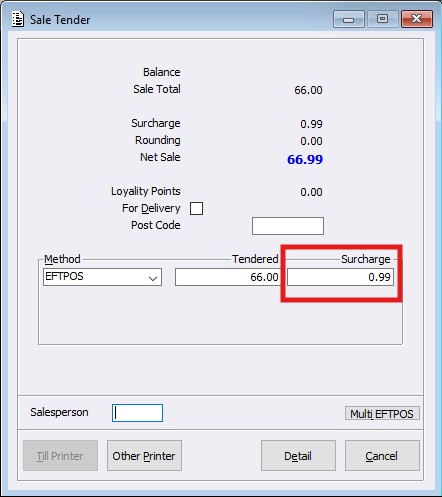
Currently the Point of Sale system has the ability to add a Payment Surcharge when an Account Customer pays their account balance via Credit Card options.
Now, this functionality has been extended to cover Cash Sales when using EFTPOS or Manual Card payment options. Meaning, the ‘POS Payment Surcharge’ configurations within ‘Global Parameters’ can now also apply to ‘Point of Sale’ Sales and not just an ‘Account Payment’.
To enable this feature, we have updated the POS Payment Surcharge Parameters within the Global Parameters > Payment Surcharge menu.
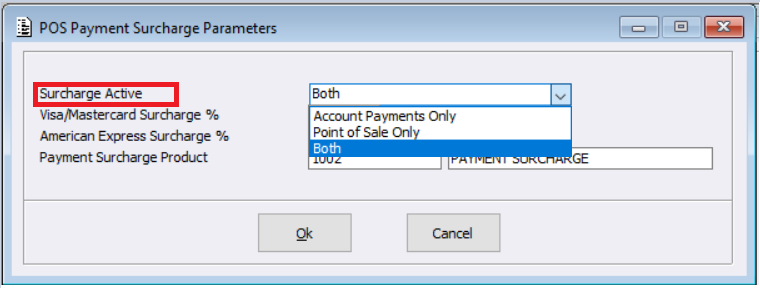
A new field option called ‘Surcharge Active’ has been created and has the following options:
- Account Payments Only
- Point of Sale Only
- Both (Default)
It should be noted that for those sites with pre-existing Surcharges configured, upon installation the system will set this new configuration to ‘Account Payments Only’.
Note: Surcharge functionality continues to not apply within the Short Term Debtor System for COD Payments.
How this works within Point of Sale
Once the Sale transaction has progressed to the tender screen, users select the method of payment type: either ‘EFTPOS’ or ‘Manual Card’. A new window will load, the user will then need to select the card type.
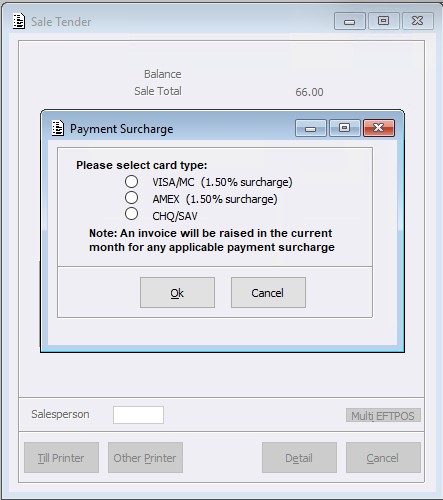
The calculated surcharge will be added to the Sale. On completion, the configured Surcharge Product will be added to the Invoice.