
A number of enhancements have been made within the Picker Enquiry and Report menus
Let’s step through them:
Invoice Configuration > New ‘Picker / Packer’ settings
Within the Invoice Configuration menu, a new button called ‘Picker / Packer’ has been created, allowing sites to configure how invoices are grouped by their Picker, along with an automatic refresh interval.
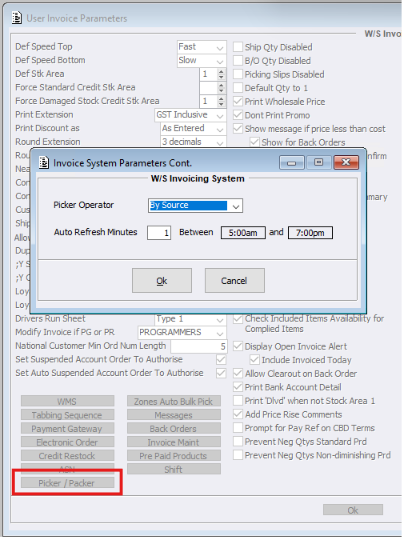
The following configuration options are available:
The ‘Picker Operator’ setting determines which operator is used when grouping picking results:
- By Source: Default setting – operator is determined by the system used to perform the scan or confirmation:
- Confirmations System – Packer
- RFGuns – Picker
- Picker
- Packer
The ‘Auto Refresh Minutes’ setting will allow sites to enter in how many minutes before the system will auto refresh the results on the screen. Note: If left blank or set to 0 minutes, the refresh will not occur and disable automatic refreshing.
Picking Enquiry and Picking Report > enhanced search and reporting functionality
Within the Picking Enquiry and Picking Report, several enhancements have been made to provide greater flexibility when searching, reviewing and reporting on picking and packing activity.
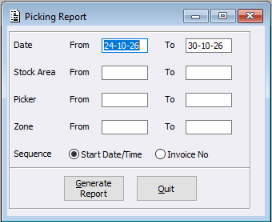
The following search qualifiers have been created:
- Picker From
- Picker To
- Zone From
- Zone To
These qualifiers allow users to narrow their results to specific pickers or zones. Both the Picking Enquiry and Picking Report will now use the ‘Picker Operator’ setting within Invoice Configuration to determine how picking and packing results are grouped.
Picking Enquiry screen
Within the Picking Enquiry screen, the following enhancements have been made:
‘Ship To Customer’
When drilling down into the enquiry results, the ‘Ship To Customer’ will now be displayed alongside the Invoice Number, making it easier to identify the customer associated with each invoice.
‘Auto Refresh’
A new ‘Auto Refresh’ tick box has been created, allowing the enquiry results to refresh automatically at the interval specified within Invoice Configuration.
Automatic refreshing will occur when:
- The ‘Auto Refresh’ tick box is set to ‘True’
- The ‘Auto Refresh Minutes’ configuration contains a value greater than zero
The refresh interval is calculated from the last time the enquiry results were loaded. If a user performs another search or manually reloads the results, the refresh timer will restart.

Scan Percentage
The ‘Scan %’ calculation has been enhanced to provide a more accurate representation of scanning activity. The percentage will now be calculated using only invoice lines where the ‘Scanned’ tick box is applicable and visible. This means that invoice lines excluded from scanning requirements, such as products without barcodes, will no longer reduce the overall can percentage. Where an invoice contains no applicable scanned results, the ‘Scan %’ will now display as blank rather than 0%.