
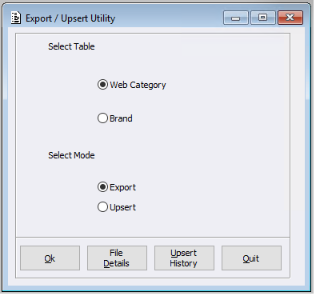
Within the ACR System, a new menu item called ‘Export / Upsert Utility’ has been created.
This utility allows users to export, update and create Brand and Web Category records using a tab-delimited file, providing an easier way to manage and maintain this information in bulk.
The utility supports the following:
- Exporting existing Brand and Web Category records to a file.
- Updating existing records, including changing their descriptions or identifiers.
- Creating new records from an imported file.
- Viewing statistical information showing the number of products assigned to each Brand or Web Category.
File requirements
The Export / Upsert Utility uses tab-delimited files. The first row of the file must contain the column headings. Column headings are not case-sensitive, but must match the supported field names. The following fields are available for each export.
Note: this will export all records
Web Category
- Web Category Level 1 (Identifier field, mandatory)
- Web Category Level 2 (Identifier field, when this field has a value, ‘Web Category Level 1’ becomes mandatory)
- Web Category Level 3 (Identifier field, when this field has a value, ‘Web Category Level 1’ and ‘Web Category Level 2’ becomes mandatory)
- Web Category Level 4 (Identifier field, when this field has a value, ‘Web Category Level 1’, ‘Web Category Level 2’ and ‘Web Category Level 3’ becomes mandatory)
- Web Category Level 5 (Identifier field, when this field has a value, ‘Web Category Level 1’, ‘Web Category Level 2’, ‘Web Category Level 3’ and ‘Web Category Level 4’ becomes mandatory)
- Web Category Level 6 (Identifier field, when this field has a value, ‘Web Category Level 1’, ‘Web Category Level 2’, ‘Web Category Level 3’, ‘Web Category Level 4’ and ‘Web Category Level 5’ becomes mandatory)
- New Web Category Level 1
- New Web Category Level 2 (Identifier field, when this field has a value, ‘New Web Category Level 1’ becomes mandatory)
- New Web Category Level 3 (Identifier field, when this field has a value, ‘New Web Category Level 1’ and ‘New Web Category Level 2’ becomes mandatory)
- New Web Category Level 4 (Identifier field, when this field has a value, ‘New Web Category Level 1’, ‘New Web Category Level 2’ and ‘New Web Category Level 3’ becomes mandatory)
- New Web Category Level 5 (Identifier field, when this field has a value, ‘New Web Category Level 1’, New ‘Web Category Level 2’, ‘New Web Category Level 3’ and ‘New Web Category Level 4’ becomes mandatory)
- New Web Category Level 6 (Identifier field, when this field has a value, ‘New Web Category Level 1’, ‘New Web Category Level 2’, ‘New Web Category Level 3’, ‘New Web Category Level 4’ and ‘New Web Category Level 5’ becomes mandatory)
- Discontinued Total (Statistical, export only)
- Inactive Total (Statistical, export only)
- Web Output False Total (Statistical, export only)
- Total (Statistical, export only)
Brand
- Brand Description (Identifier field, mandatory)
- New Brand Description (Max size of 20 characters)
- Website Address (Max size of 60 characters)
- Discontinued Total (Statistical, export only)
- Inactive Total (Statistical, export only)
- Web Output False Total (Statistical, export only)
- Total (Statistical, export only)
The statistical fields provide a count of products associated with each Brand or Web Category, including discontinued products, inactive products, products excluded from Web Output and the total number of products. These fields are provided for reporting purposes only and cannot be updated through the utility.
Using the Upsert function
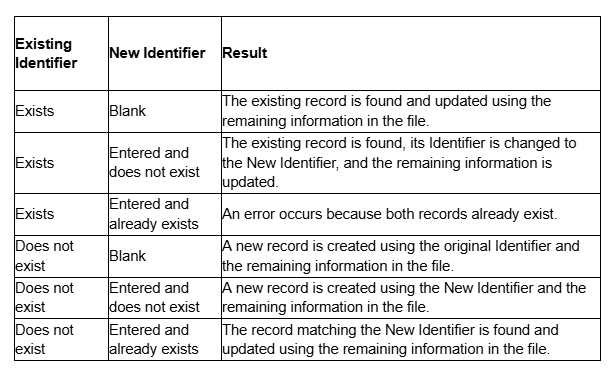
The ‘Upsert’ function allows users to create new records or update existing records using the information contained in the imported file. The utility identifies existing records using the Identifier field. Where a matching record is found, the existing record is updated. Where no matching record exists, a new record can be created. The corresponding ‘New’ Identifier field can also be used to change an existing record’s identifier.
Please note: The Upsert function cannot delete records.
How the Upsert function processes records
The action performed depends on whether the original Identifier exists and whether a New Identifier has been supplied. This allows the same utility to be used for both creating and maintaining records without requiring separate import processes.
Changing an existing Identifier
To change an existing Identifier, enter the current value in the Identifier field and the replacement value in the corresponding ‘New’ Identifier field.
For example, to rename an existing Brand:

The utility locates the existing ‘ABC TOOLS’ Brand, changes its description to ‘ABC INDUSTRIAL TOOLS’ and updates the Website Address. If the New Identifier already belongs to another record, the update cannot proceed.
Loading an Upsert file
When an Upsert file is loaded, the utility reads only the supported columns for the selected record type. Any additional columns contained in the file are ignored. Statistical columns are available in exported files but are not loaded or displayed when performing an Upsert. The remaining supported columns are displayed in the order defined by the utility, regardless of their position in the imported file.
For example, when loading a Brand Upsert file, the following columns are displayed:
- Brand Description
- New Brand Description
- Website Address
This allows users to work with the relevant fields without needing to remove statistical information or additional columns from an exported file before loading it.
Processing an Upsert file
When an Upsert is performed, the utility processes the records contained in the file. If an issue is encountered, such as a record being locked or an Identifier conflict, the utility cannot skip the affected record and continue processing the remaining entries. The process must either complete successfully or be aborted. Users should therefore check the contents of the file before processing, particularly when changing existing Identifiers.
Please note: The Export / Upsert Utility is intended for creating and updating records in bulk. It does not provide functionality for deleting existing records.