Within ‘Custom Data Maintenance’, sites can now create and maintain personalised fields for Product, Customer and Supplier records. Custom Data provides sites with a flexible way to capture and maintain additional information that is specific to their business. These fields can be created within Product, Customer and Supplier records, then used within searches to help users find and report on personalised information.
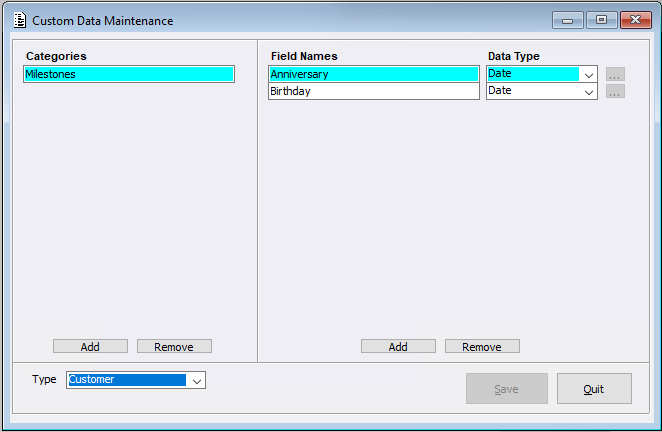
Users can select the relevant ‘Record Type’:
- ‘Product’
- ‘Customer’
- ‘Supplier’
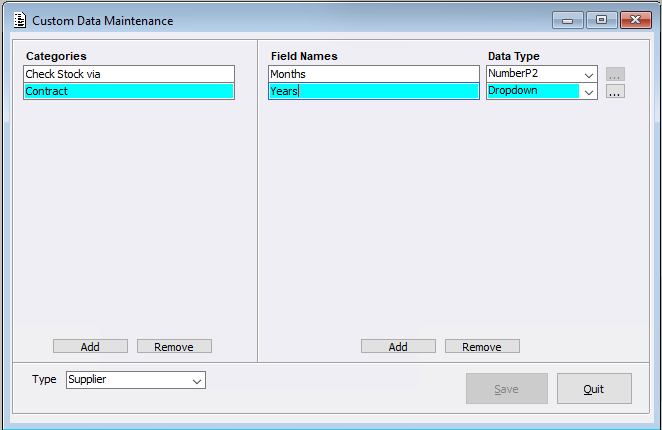
Users can then select ‘Add’ to create a category, followed by the custom field name and field data type.
The available data field types within the dropdown menu are:
- ‘Text’, supporting up to 30 characters
- ‘Integer’
- ‘Number P1’
- ‘Number P2’
- ‘Number P3’
- ‘Date’
- ‘Boolean’
- ‘Dropdown’
When creating a ‘Dropdown’ field, users can select the ellipsis button to define the available options.
Please note: a category must contain at least one field before it will be available against the selected record type.
Product / Customer / Supplier Maintenance menus
In support of this new menu, a new ‘Custom Data’ button has been created within
- Product Maintenance
- Customer Maintenance
- Supplier Maintenance
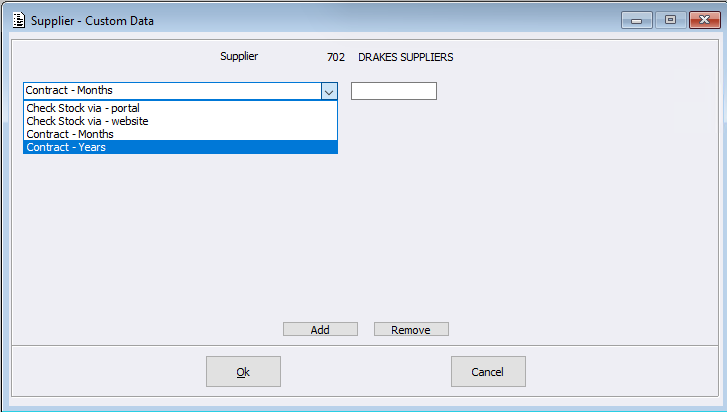
Users can select this button to attach and maintain previously created Custom Data fields against a record.
This allows sites:
- to store additional information specific to their products, such as the colour of a stocked item
- to store personalised information that is not covered by the standard Customer fields.
- to store additional information specific to their Suppliers, for example, sites could record the number of months or years covered by a supplier contract.
For example, a site could create a ‘Contract’ category against Supplier records, then add fields for the contract term in months or years. These fields could use a dropdown containing predefined terms or a number field for free entry.
Custom Data Maintenance:
Supplier Maintenance > Custom Data