
In accordance with the RBA changes from the 1st of October, businesses will no longer be able to add surcharges to Visa, Mastercard, American Express or EFTPOS card payments for customers. To comply with these new rules, sites that have surcharges configured will now need to remove them by October 1st.
To remove configured Eftpos Surcharges within ACR, please follow the below steps:
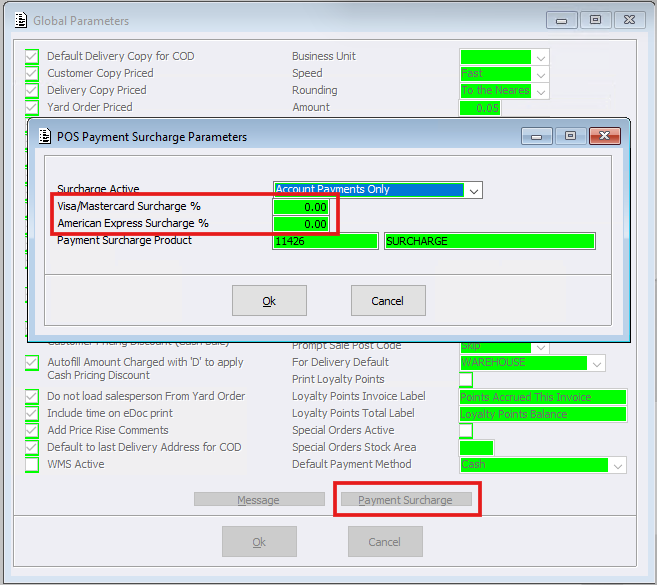
- Open Global Parameters > Payment Surcharge
- Reduced the Surcharge percentages to zero (0.00%)
- Ok to Save and exit
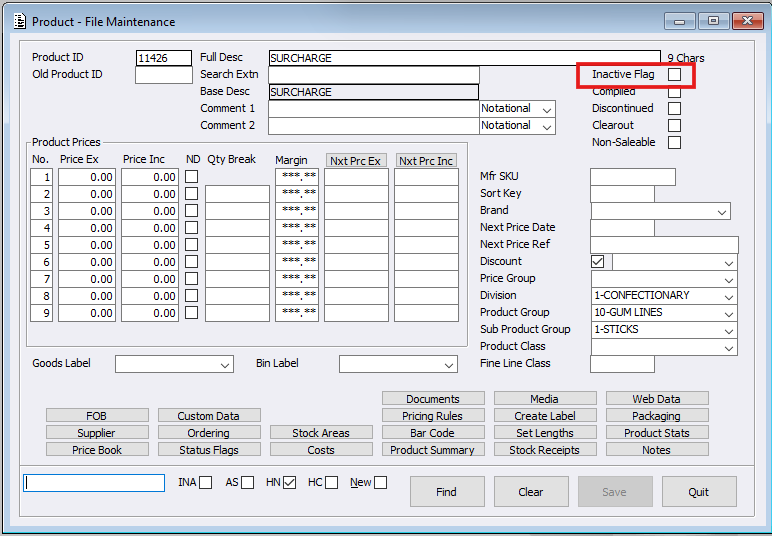
- Open Product Maintenance > keyin Payment Surcharge Product ID
- Once loaded, make this product ‘Inactive’ by ticking the Inactive flag box
- Select Save
Please note: that once the configured percentage value is reduced to zero, the Payment Surcharge window will no longer load when processing payments within Point of Sale.